<?xml version="1.0" encoding="utf-8"?><feed xmlns="http://www.w3.org/2005/Atom" ><generator uri="https://jekyllrb.com/" version="3.10.0">Jekyll</generator><link href="https://vinsonguo.github.io/feed.xml" rel="self" type="application/atom+xml" /><link href="https://vinsonguo.github.io/" rel="alternate" type="text/html" /><updated>2026-04-11T14:44:42+00:00</updated><id>https://vinsonguo.github.io/feed.xml</id><title type="html">Vinson Guo</title><subtitle>Mobile Developer | Android/iOS/Flutter/React Native</subtitle><author><name>Vinson Guo</name></author><entry><title type="html">Build Your RSS Backend for SmartRSS: A Beginner’s Guide to FreshRSS, Miniflux, and RSSHub</title><link href="https://vinsonguo.github.io/build-your-smartrss-backend" rel="alternate" type="text/html" title="Build Your RSS Backend for SmartRSS: A Beginner’s Guide to FreshRSS, Miniflux, and RSSHub" /><published>2025-12-31T00:00:00+00:00</published><updated>2025-12-31T00:00:00+00:00</updated><id>https://vinsonguo.github.io/build-your-smartrss-backend</id><content type="html" xml:base="https://vinsonguo.github.io/build-your-smartrss-backend"><![CDATA[<p>Want to supercharge your <strong>SmartRSS</strong> experience with a powerful, self-hosted backend? This guide will show you how to set up <strong>FreshRSS</strong>, <strong>Miniflux</strong>, and <strong>RSSHub</strong> - even if you’ve never touched a server before! These services will sync seamlessly with SmartRSS, giving you complete control over your RSS reading experience.</p>

<h2 id="why-build-your-own-rss-backend">Why Build Your Own RSS Backend?</h2>

<p>Setting up your own RSS server gives you amazing benefits:</p>

<ul>
  <li><strong>Perfect SmartRSS Integration</strong>: Sync your feeds across all devices</li>
  <li><strong>Complete Privacy</strong>: Your reading habits stay on your own server</li>
  <li><strong>No Monthly Fees</strong>: Pay once for a VPS, run forever</li>
  <li><strong>Unlimited Feeds</strong>: No restrictions on the number of subscriptions</li>
  <li><strong>Super Fast</strong>: Your own dedicated RSS infrastructure</li>
</ul>

<h2 id="what-youll-need">What You’ll Need</h2>

<ul>
  <li>A VPS (Virtual Private Server) - $5-10/month</li>
  <li>About 30 minutes of your time</li>
  <li>No coding experience required!</li>
</ul>

<h2 id="quick-start-try-official-instances-first">Quick Start: Try Official Instances First</h2>

<p>Before setting up your own server, you can try these official demo instances:</p>

<h3 id="official-freshrss-demo">Official FreshRSS Demo</h3>
<ul>
  <li><strong>URL</strong>: <code class="language-plaintext highlighter-rouge">https://demo.freshrss.org/</code></li>
  <li><strong>Features</strong>: Clean interface, mobile-friendly, great API support</li>
  <li><strong>Perfect for</strong>: Beginners who want a traditional RSS experience</li>
</ul>

<h3 id="official-miniflux-demo">Official Miniflux Demo</h3>
<ul>
  <li><strong>URL</strong>: <code class="language-plaintext highlighter-rouge">https://miniflux.app/</code> (offers free trial)</li>
  <li><strong>Features</strong>: Modern design, excellent keyboard shortcuts, powerful API</li>
  <li><strong>Perfect for</strong>: Power users who want speed and efficiency</li>
</ul>

<p>These demos let you test both services before deciding which one to self-host. Both work perfectly with SmartRSS!</p>

<h2 id="step-1-get-your-vps-ready">Step 1: Get Your VPS Ready</h2>

<h3 id="choosing-and-purchasing-a-vps">Choosing and Purchasing a VPS</h3>

<p>For RSS hosting, you don’t need anything powerful. Here’s what I recommend:</p>

<ul>
  <li><strong>Minimum specs</strong>: 1GB RAM, 1 CPU core, 20GB storage</li>
  <li><strong>Perfect choice</strong>: 2GB RAM, 1 CPU core, 40GB storage</li>
  <li><strong>Cost</strong>: $5-10/month</li>
</ul>

<p><strong>Easy VPS providers for beginners:</strong></p>
<ul>
  <li><strong>DigitalOcean</strong> - Most beginner-friendly, great tutorials</li>
  <li><strong>Linode</strong> - Excellent performance, good support</li>
  <li><strong>Vultr</strong> - Simple interface, reliable service</li>
</ul>

<h3 id="deploy-your-server-super-simple">Deploy Your Server (Super Simple!)</h3>

<ol>
  <li>Create an account at your chosen provider</li>
  <li>Click “Create Droplet/Server”</li>
  <li>Choose <strong>Ubuntu 22.04 LTS</strong></li>
  <li>Pick the $5-10/month plan</li>
  <li>Click “Create” and wait 2-3 minutes</li>
  <li>You’ll get an email with your server IP and password!</li>
</ol>

<h2 id="step-2-connect-to-your-server">Step 2: Connect to Your Server</h2>

<p>Open your terminal (or PowerShell on Windows) and connect:</p>

<div class="language-bash highlighter-rouge"><div class="highlight"><pre class="highlight"><code>ssh root@your_server_ip
</code></pre></div></div>

<p><strong>First time?</strong> You’ll see a message asking “Are you sure you want to continue connecting?” Type <code class="language-plaintext highlighter-rouge">yes</code> and press Enter.</p>

<p><strong>Password?</strong> Paste the password from your VPS provider’s email (you won’t see it appear on screen - that’s normal!).</p>

<h2 id="step-3-install-docker-one-command">Step 3: Install Docker (One Command!)</h2>

<p>Just copy and paste this single command:</p>

<div class="language-bash highlighter-rouge"><div class="highlight"><pre class="highlight"><code>curl <span class="nt">-fsSL</span> https://get.docker.com | sh
</code></pre></div></div>

<p>This will automatically install Docker and everything you need. Grab a coffee - it takes 2-3 minutes!</p>

<h3 id="test-docker-installation">Test Docker Installation</h3>

<div class="language-bash highlighter-rouge"><div class="highlight"><pre class="highlight"><code>docker run hello-world
</code></pre></div></div>

<p>If you see “Hello from Docker!” - you’re ready to go!</p>

<h2 id="step-4-choose-your-rss-services">Step 4: Choose Your RSS Services</h2>

<p>Before setting up, let’s understand your options. We have a <strong>2+1 architecture</strong>:</p>

<h3 id="the-main-rss-reader-choose-one">The Main RSS Reader (Choose One)</h3>

<p>You need <strong>one</strong> main RSS reader to manage your feeds:</p>

<h4 id="freshrss---the-beginner-friendly-choice">FreshRSS - The Beginner-Friendly Choice</h4>

<p><strong>Perfect for:</strong></p>
<ul>
  <li>First-time self-hosters</li>
  <li>Users who want a traditional, familiar interface</li>
  <li>Those who prefer simplicity over advanced features</li>
</ul>

<p><strong>Why Choose FreshRSS:</strong></p>
<ul>
  <li>Clean, intuitive web interface</li>
  <li>Easy mobile app integration</li>
  <li>Great API support for SmartRSS</li>
  <li>Simple setup and maintenance</li>
  <li>Large community and documentation</li>
</ul>

<p><strong>Resource Usage:</strong> Light (~100MB RAM)</p>

<h4 id="miniflux---the-power-users-choice">Miniflux - The Power User’s Choice</h4>

<p><strong>Perfect for:</strong></p>
<ul>
  <li>Experienced users who want maximum speed</li>
  <li>Keyboard shortcut enthusiasts</li>
  <li>Users who prefer minimal, distraction-free reading</li>
  <li>Those who want the most modern tech stack</li>
</ul>

<p><strong>Why Choose Miniflux:</strong></p>
<ul>
  <li>Blazing fast performance</li>
  <li>Excellent keyboard navigation</li>
  <li>Powerful filtering and search</li>
  <li>Modern, responsive design</li>
  <li>Built-in feed fetching optimization</li>
</ul>

<p><strong>Resource Usage:</strong> Light (~150MB RAM including PostgreSQL)</p>

<p><strong>Can’t Decide?</strong> Start with <strong>FreshRSS</strong> - it’s easier for beginners, and you can always switch later!</p>

<h3 id="optional-rsshub---the-rss-supercharger">Optional: RSSHub - The RSS Supercharger</h3>

<p><strong>What is RSSHub?</strong></p>

<p>RSSHub is a game-changer for RSS users. Many modern websites (YouTube, Twitter, Instagram, Telegram, etc.) don’t provide RSS feeds anymore. RSSHub solves this by generating RSS feeds from virtually any website!</p>

<p><strong>Why You Might Want RSSHub:</strong></p>

<ol>
  <li><strong>No RSS? No Problem!</strong> - Generate feeds from 400+ platforms</li>
  <li><strong>Social Media Feeds</strong> - YouTube channels, Twitter users, Instagram posts</li>
  <li><strong>Custom Content</strong> - Create feeds from specific websites, filters, or keywords</li>
  <li><strong>Flexible &amp; Powerful</strong> - Customize feed content, update frequency, and format</li>
  <li><strong>Free &amp; Open</strong> - No API keys needed, community-driven</li>
</ol>

<p><strong>Examples of what RSSHub can do:</strong></p>
<ul>
  <li>Get RSS feeds from your favorite YouTube channels</li>
  <li>Follow Twitter users without using Twitter</li>
  <li>Track Instagram posts from specific accounts</li>
  <li>Monitor Telegram channels</li>
  <li>Create feeds from websites that don’t have RSS</li>
  <li>And hundreds more use cases!</li>
</ul>

<p><strong>Resource Usage:</strong> Moderate (~200MB RAM with Redis)</p>

<p><strong>Recommendation:</strong> Start without RSSHub. Add it later if you need feeds from social media or non-RSS websites.</p>

<h2 id="step-5-set-up-your-chosen-service">Step 5: Set Up Your Chosen Service</h2>

<h3 id="create-project-directory">Create Project Directory</h3>

<div class="language-bash highlighter-rouge"><div class="highlight"><pre class="highlight"><code><span class="nb">mkdir</span> <span class="nt">-p</span> ~/rss-services
<span class="nb">cd</span> ~/rss-services
</code></pre></div></div>

<h3 id="option-a-freshrss-setup-recommended-for-beginners">Option A: FreshRSS Setup (Recommended for Beginners)</h3>

<div class="language-bash highlighter-rouge"><div class="highlight"><pre class="highlight"><code><span class="nb">mkdir </span>freshrss <span class="o">&amp;&amp;</span> <span class="nb">cd </span>freshrss
nano docker-compose.yml
</code></pre></div></div>

<div class="language-yaml highlighter-rouge"><div class="highlight"><pre class="highlight"><code><span class="na">version</span><span class="pi">:</span> <span class="s2">"</span><span class="s">3.8"</span>

<span class="na">services</span><span class="pi">:</span>
  <span class="na">freshrss</span><span class="pi">:</span>
    <span class="na">image</span><span class="pi">:</span> <span class="s">freshrss/freshrss:latest</span>
    <span class="na">container_name</span><span class="pi">:</span> <span class="s">freshrss</span>
    <span class="na">restart</span><span class="pi">:</span> <span class="s">unless-stopped</span>
    <span class="na">ports</span><span class="pi">:</span>
      <span class="pi">-</span> <span class="s2">"</span><span class="s">8080:80"</span>
    <span class="na">volumes</span><span class="pi">:</span>
      <span class="pi">-</span> <span class="s">./freshrss-data:/var/www/FreshRSS/data</span>
      <span class="pi">-</span> <span class="s">./freshrss-extensions:/var/www/FreshRSS/extensions</span>
    <span class="na">environment</span><span class="pi">:</span>
      <span class="pi">-</span> <span class="s">CRON_MIN=*/10</span>
      <span class="pi">-</span> <span class="s">TZ=Asia/Shanghai</span>
</code></pre></div></div>

<p><strong>Configuration:</strong></p>
<ul>
  <li><code class="language-plaintext highlighter-rouge">TZ=Asia/Shanghai</code> → Change to your timezone</li>
</ul>

<p><strong>Save and exit</strong>: Press <code class="language-plaintext highlighter-rouge">Ctrl+X</code>, then <code class="language-plaintext highlighter-rouge">Y</code>, then <code class="language-plaintext highlighter-rouge">Enter</code></p>

<h3 id="option-b-miniflux-setup-for-power-users">Option B: Miniflux Setup (For Power Users)</h3>

<div class="language-bash highlighter-rouge"><div class="highlight"><pre class="highlight"><code><span class="nb">cd</span> ~/rss-services
<span class="nb">mkdir </span>miniflux <span class="o">&amp;&amp;</span> <span class="nb">cd </span>miniflux
nano docker-compose.yml
</code></pre></div></div>

<p>Copy and paste this configuration:</p>

<div class="language-yaml highlighter-rouge"><div class="highlight"><pre class="highlight"><code><span class="na">version</span><span class="pi">:</span> <span class="s2">"</span><span class="s">3.8"</span>

<span class="na">services</span><span class="pi">:</span>
  <span class="na">miniflux</span><span class="pi">:</span>
    <span class="na">image</span><span class="pi">:</span> <span class="s">miniflux/miniflux:latest</span>
    <span class="na">container_name</span><span class="pi">:</span> <span class="s">miniflux</span>
    <span class="na">restart</span><span class="pi">:</span> <span class="s">unless-stopped</span>
    <span class="na">ports</span><span class="pi">:</span>
      <span class="pi">-</span> <span class="s2">"</span><span class="s">8081:8080"</span>
    <span class="na">environment</span><span class="pi">:</span>
      <span class="pi">-</span> <span class="s">DATABASE_URL=postgres://miniflux:secret@miniflux-db/miniflux?sslmode=disable</span>
      <span class="pi">-</span> <span class="s">RUN_MIGRATIONS=1</span>
      <span class="pi">-</span> <span class="s">CREATE_ADMIN=1</span>
      <span class="pi">-</span> <span class="s">ADMIN_USERNAME=admin</span>
      <span class="pi">-</span> <span class="s">ADMIN_PASSWORD=changeme</span>
      <span class="pi">-</span> <span class="s">BASE_URL=http://your_server_ip:8081</span>
      <span class="pi">-</span> <span class="s">CLEANUP_FREQUENCY=24</span>
      <span class="pi">-</span> <span class="s">POLLING_FREQUENCY=60</span>
      <span class="pi">-</span> <span class="s">TZ=Asia/Shanghai</span>
    <span class="na">depends_on</span><span class="pi">:</span>
      <span class="pi">-</span> <span class="s">miniflux-db</span>

  <span class="na">miniflux-db</span><span class="pi">:</span>
    <span class="na">image</span><span class="pi">:</span> <span class="s">postgres:15</span>
    <span class="na">container_name</span><span class="pi">:</span> <span class="s">miniflux-db</span>
    <span class="na">restart</span><span class="pi">:</span> <span class="s">unless-stopped</span>
    <span class="na">environment</span><span class="pi">:</span>
      <span class="pi">-</span> <span class="s">POSTGRES_USER=miniflux</span>
      <span class="pi">-</span> <span class="s">POSTGRES_PASSWORD=secret</span>
      <span class="pi">-</span> <span class="s">POSTGRES_DB=miniflux</span>
    <span class="na">volumes</span><span class="pi">:</span>
      <span class="pi">-</span> <span class="s">miniflux-db:/var/lib/postgresql/data</span>
    <span class="na">healthcheck</span><span class="pi">:</span>
      <span class="na">test</span><span class="pi">:</span> <span class="pi">[</span><span class="s2">"</span><span class="s">CMD-SHELL"</span><span class="pi">,</span> <span class="s2">"</span><span class="s">pg_isready</span><span class="nv"> </span><span class="s">-U</span><span class="nv"> </span><span class="s">miniflux"</span><span class="pi">]</span>
      <span class="na">interval</span><span class="pi">:</span> <span class="s">10s</span>
      <span class="na">timeout</span><span class="pi">:</span> <span class="s">5s</span>
      <span class="na">retries</span><span class="pi">:</span> <span class="m">5</span>

<span class="na">volumes</span><span class="pi">:</span>
  <span class="na">miniflux-db</span><span class="pi">:</span>
</code></pre></div></div>

<p><strong>Configuration:</strong></p>
<ul>
  <li><code class="language-plaintext highlighter-rouge">ADMIN_USERNAME=admin</code> → Your desired username</li>
  <li><code class="language-plaintext highlighter-rouge">ADMIN_PASSWORD=changeme</code> → Choose a strong password</li>
  <li><code class="language-plaintext highlighter-rouge">BASE_URL=http://your_server_ip:8081</code> → Replace with your server IP</li>
  <li><code class="language-plaintext highlighter-rouge">TZ=Asia/Shanghai</code> → Change to your timezone</li>
</ul>

<p><strong>Save and exit</strong>: Press <code class="language-plaintext highlighter-rouge">Ctrl+X</code>, then <code class="language-plaintext highlighter-rouge">Y</code>, then <code class="language-plaintext highlighter-rouge">Enter</code></p>

<h3 id="option-c-add-rsshub-optional">Option C: Add RSSHub (Optional)</h3>

<p><strong>Only install RSSHub if you need feeds from social media or non-RSS websites.</strong></p>

<div class="language-bash highlighter-rouge"><div class="highlight"><pre class="highlight"><code><span class="nb">cd</span> ~/rss-services
<span class="nb">mkdir </span>rsshub <span class="o">&amp;&amp;</span> <span class="nb">cd </span>rsshub
nano docker-compose.yml
</code></pre></div></div>

<p>Copy and paste this configuration:</p>

<div class="language-yaml highlighter-rouge"><div class="highlight"><pre class="highlight"><code><span class="na">version</span><span class="pi">:</span> <span class="s2">"</span><span class="s">3.8"</span>

<span class="na">services</span><span class="pi">:</span>
  <span class="na">rsshub</span><span class="pi">:</span>
    <span class="na">image</span><span class="pi">:</span> <span class="s">diygod/rsshub:latest</span>
    <span class="na">container_name</span><span class="pi">:</span> <span class="s">rsshub</span>
    <span class="na">restart</span><span class="pi">:</span> <span class="s">unless-stopped</span>
    <span class="na">ports</span><span class="pi">:</span>
      <span class="pi">-</span> <span class="s2">"</span><span class="s">1200:1200"</span>
    <span class="na">environment</span><span class="pi">:</span>
      <span class="na">NODE_ENV</span><span class="pi">:</span> <span class="s">production</span>
      <span class="na">CACHE_TYPE</span><span class="pi">:</span> <span class="s">redis</span>
      <span class="na">REDIS_URL</span><span class="pi">:</span> <span class="s">redis://rsshub-redis:6379/</span>
    <span class="na">depends_on</span><span class="pi">:</span>
      <span class="pi">-</span> <span class="s">rsshub-redis</span>

  <span class="na">rsshub-redis</span><span class="pi">:</span>
    <span class="na">image</span><span class="pi">:</span> <span class="s">redis:alpine</span>
    <span class="na">container_name</span><span class="pi">:</span> <span class="s">rsshub-redis</span>
    <span class="na">restart</span><span class="pi">:</span> <span class="s">unless-stopped</span>
    <span class="na">volumes</span><span class="pi">:</span>
      <span class="pi">-</span> <span class="s">rsshub-redis-data:/data</span>
    <span class="na">command</span><span class="pi">:</span> <span class="s">redis-server --appendonly yes</span>

<span class="na">volumes</span><span class="pi">:</span>
  <span class="na">rsshub-redis-data</span><span class="pi">:</span>
</code></pre></div></div>

<p><strong>Save and exit</strong>: Press <code class="language-plaintext highlighter-rouge">Ctrl+X</code>, then <code class="language-plaintext highlighter-rouge">Y</code>, then <code class="language-plaintext highlighter-rouge">Enter</code></p>

<h2 id="step-6-launch-your-services">Step 6: Launch Your Services</h2>

<p>Navigate to your chosen service directory and start it:</p>

<h3 id="for-freshrss">For FreshRSS:</h3>

<div class="language-bash highlighter-rouge"><div class="highlight"><pre class="highlight"><code><span class="nb">cd</span> ~/rss-services/freshrss
docker compose up <span class="nt">-d</span>
</code></pre></div></div>

<h3 id="for-miniflux">For Miniflux:</h3>

<div class="language-bash highlighter-rouge"><div class="highlight"><pre class="highlight"><code><span class="nb">cd</span> ~/rss-services/miniflux
docker compose up <span class="nt">-d</span>
</code></pre></div></div>

<h3 id="for-rsshub-if-installed">For RSSHub (if installed):</h3>

<div class="language-bash highlighter-rouge"><div class="highlight"><pre class="highlight"><code><span class="nb">cd</span> ~/rss-services/rsshub
docker compose up <span class="nt">-d</span>
</code></pre></div></div>

<p>This will download and start your services. Wait 2-3 minutes for everything to initialize.</p>

<h3 id="check-if-everything-is-running">Check if Everything is Running</h3>

<div class="language-bash highlighter-rouge"><div class="highlight"><pre class="highlight"><code><span class="c"># For FreshRSS</span>
<span class="nb">cd</span> ~/rss-services/freshrss <span class="o">&amp;&amp;</span> docker compose ps

<span class="c"># For Miniflux</span>
<span class="nb">cd</span> ~/rss-services/miniflux <span class="o">&amp;&amp;</span> docker compose ps

<span class="c"># For RSSHub</span>
<span class="nb">cd</span> ~/rss-services/rsshub <span class="o">&amp;&amp;</span> docker compose ps
</code></pre></div></div>

<p>You should see services marked as “Up” - that means they’re working!</p>

<h2 id="step-7-access-and-configure-your-services">Step 7: Access and Configure Your Services</h2>

<h3 id="freshrss-setup">FreshRSS Setup</h3>
<ul>
  <li><strong>URL</strong>: <code class="language-plaintext highlighter-rouge">http://your_server_ip:8080</code></li>
  <li><strong>First time</strong>: Click “Installation” and create your admin account</li>
  <li><strong>Perfect for</strong>: Beginners who want a simple, clean interface</li>
</ul>

<h3 id="miniflux-setup">Miniflux Setup</h3>
<ul>
  <li><strong>URL</strong>: <code class="language-plaintext highlighter-rouge">http://your_server_ip:8081</code></li>
  <li><strong>Login</strong>: Use the username/password you set in the config file</li>
  <li><strong>Perfect for</strong>: Users who want speed and powerful features</li>
</ul>

<h3 id="rsshub-no-setup-needed">RSSHub (No Setup Needed!)</h3>
<ul>
  <li><strong>URL</strong>: <code class="language-plaintext highlighter-rouge">http://your_server_ip:1200</code></li>
  <li><strong>No login required</strong> - it just works!</li>
  <li><strong>Use it to</strong>: Generate RSS feeds from YouTube, Twitter, Instagram, etc.</li>
  <li><strong>Documentation</strong>: Visit the URL to see all available routes and examples</li>
</ul>

<h2 id="step-8-enable-api-access-for-smartrss">Step 8: Enable API Access for SmartRSS</h2>

<p>Now the exciting part - connecting your RSS services to SmartRSS!</p>

<h3 id="enable-freshrss-api">Enable FreshRSS API</h3>

<ol>
  <li><strong>Login to FreshRSS</strong> at <code class="language-plaintext highlighter-rouge">http://your_server_ip:8080</code></li>
  <li><strong>Click on your username</strong> (top right) → <strong>Administration</strong></li>
  <li><strong>Go to “Authentication”</strong> → Enable <strong>“Enable API access”</strong></li>
  <li><strong>Save changes</strong></li>
  <li><strong>Generate API credentials</strong>:
    <ul>
      <li>Still in Administration, go to <strong>“Profile”</strong></li>
      <li>Scroll to <strong>“API”</strong> section</li>
      <li>Click <strong>“Generate”</strong> to create your API password</li>
      <li><strong>Copy your API username and password</strong> - you’ll need these for SmartRSS!</li>
    </ul>
  </li>
</ol>

<h3 id="enable-miniflux-api">Enable Miniflux API</h3>

<p>Great news! <strong>Miniflux API is enabled by default</strong> - no setup needed!</p>

<h2 id="step-9-connect-smartrss-to-your-server">Step 9: Connect SmartRSS to Your Server</h2>

<p>Now you can connect SmartRSS to your self-hosted services!</p>

<h3 id="for-freshrss-users">For FreshRSS Users:</h3>

<ol>
  <li><strong>Open SmartRSS</strong> on your device</li>
  <li><strong>Add a new account</strong> → Select <strong>“FreshRSS”</strong></li>
  <li><strong>Enter your server details</strong>:
    <ul>
      <li><strong>Server URL</strong>: <code class="language-plaintext highlighter-rouge">http://your_server_ip:8080/api/</code></li>
      <li><strong>Username</strong>: Your FreshRSS username</li>
      <li><strong>Password</strong>: Your API password (from Step 7)</li>
    </ul>
  </li>
  <li><strong>Test connection</strong> and enjoy your synced feeds!</li>
</ol>

<h3 id="for-miniflux-users">For Miniflux Users:</h3>

<ol>
  <li><strong>Open SmartRSS</strong> on your device</li>
  <li><strong>Add a new account</strong> → Select <strong>“Miniflux”</strong></li>
  <li><strong>Enter your server details</strong>:
    <ul>
      <li><strong>Server URL</strong>: <code class="language-plaintext highlighter-rouge">http://your_server_ip:8081/</code></li>
      <li><strong>Username</strong>: Your Miniflux username</li>
      <li><strong>Password</strong>: Your Miniflux password</li>
    </ul>
  </li>
  <li><strong>Test connection</strong> and you’re ready to go!</li>
</ol>

<h3 id="add-feeds-from-rsshub">Add Feeds from RSSHub</h3>

<p>Want to follow a YouTube channel or Twitter user that doesn’t have RSS?</p>

<ol>
  <li><strong>Browse RSSHub</strong> at <code class="language-plaintext highlighter-rouge">http://your_server_ip:1200</code></li>
  <li><strong>Find the route you need</strong> (e.g., <code class="language-plaintext highlighter-rouge">/youtube/user/:username</code>)</li>
  <li><strong>Copy the RSS feed URL</strong></li>
  <li><strong>Add it directly in SmartRSS</strong> or your FreshRSS/Miniflux web interface!</li>
</ol>

<p><strong>Popular RSSHub routes:</strong></p>
<ul>
  <li><strong>YouTube</strong>: <code class="language-plaintext highlighter-rouge">http://your_server_ip:1200/youtube/user/:username</code></li>
  <li><strong>Twitter</strong>: <code class="language-plaintext highlighter-rouge">http://your_server_ip:1200/twitter/user/:username</code></li>
  <li><strong>Instagram</strong>: <code class="language-plaintext highlighter-rouge">http://your_server_ip:1200/instagram/user/:username</code></li>
  <li><strong>Telegram</strong>: <code class="language-plaintext highlighter-rouge">http://your_server_ip:1200/telegram/channel/:channelname</code></li>
</ul>

<h2 id="quick-management-commands">Quick Management Commands</h2>

<h3 id="check-service-status">Check Service Status</h3>

<div class="language-bash highlighter-rouge"><div class="highlight"><pre class="highlight"><code><span class="c"># For FreshRSS</span>
<span class="nb">cd</span> ~/rss-services/freshrss <span class="o">&amp;&amp;</span> docker compose ps

<span class="c"># For Miniflux</span>
<span class="nb">cd</span> ~/rss-services/miniflux <span class="o">&amp;&amp;</span> docker compose ps

<span class="c"># For RSSHub</span>
<span class="nb">cd</span> ~/rss-services/rsshub <span class="o">&amp;&amp;</span> docker compose ps
</code></pre></div></div>

<h3 id="view-logs-if-something-goes-wrong">View Logs (if something goes wrong)</h3>

<div class="language-bash highlighter-rouge"><div class="highlight"><pre class="highlight"><code><span class="c"># For FreshRSS</span>
<span class="nb">cd</span> ~/rss-services/freshrss <span class="o">&amp;&amp;</span> docker compose logs <span class="nt">-f</span>

<span class="c"># For Miniflux</span>
<span class="nb">cd</span> ~/rss-services/miniflux <span class="o">&amp;&amp;</span> docker compose logs <span class="nt">-f</span>

<span class="c"># For RSSHub</span>
<span class="nb">cd</span> ~/rss-services/rsshub <span class="o">&amp;&amp;</span> docker compose logs <span class="nt">-f</span>
</code></pre></div></div>

<h3 id="restart-a-service">Restart a Service</h3>

<div class="language-bash highlighter-rouge"><div class="highlight"><pre class="highlight"><code><span class="c"># For FreshRSS</span>
<span class="nb">cd</span> ~/rss-services/freshrss <span class="o">&amp;&amp;</span> docker compose restart

<span class="c"># For Miniflux</span>
<span class="nb">cd</span> ~/rss-services/miniflux <span class="o">&amp;&amp;</span> docker compose restart

<span class="c"># For RSSHub</span>
<span class="nb">cd</span> ~/rss-services/rsshub <span class="o">&amp;&amp;</span> docker compose restart
</code></pre></div></div>

<h3 id="update-your-services">Update Your Services</h3>

<div class="language-bash highlighter-rouge"><div class="highlight"><pre class="highlight"><code><span class="c"># For FreshRSS</span>
<span class="nb">cd</span> ~/rss-services/freshrss <span class="o">&amp;&amp;</span> docker compose pull <span class="o">&amp;&amp;</span> docker compose up <span class="nt">-d</span>

<span class="c"># For Miniflux</span>
<span class="nb">cd</span> ~/rss-services/miniflux <span class="o">&amp;&amp;</span> docker compose pull <span class="o">&amp;&amp;</span> docker compose up <span class="nt">-d</span>

<span class="c"># For RSSHub</span>
<span class="nb">cd</span> ~/rss-services/rsshub <span class="o">&amp;&amp;</span> docker compose pull <span class="o">&amp;&amp;</span> docker compose up <span class="nt">-d</span>
</code></pre></div></div>

<h3 id="stop-services">Stop Services</h3>

<div class="language-bash highlighter-rouge"><div class="highlight"><pre class="highlight"><code><span class="c"># For FreshRSS</span>
<span class="nb">cd</span> ~/rss-services/freshrss <span class="o">&amp;&amp;</span> docker compose down

<span class="c"># For Miniflux</span>
<span class="nb">cd</span> ~/rss-services/miniflux <span class="o">&amp;&amp;</span> docker compose down

<span class="c"># For RSSHub</span>
<span class="nb">cd</span> ~/rss-services/rsshub <span class="o">&amp;&amp;</span> docker compose down
</code></pre></div></div>

<h2 id="common-issues-and-fixes">Common Issues and Fixes</h2>

<h3 id="services-wont-start">Services Won’t Start</h3>

<div class="language-bash highlighter-rouge"><div class="highlight"><pre class="highlight"><code><span class="c"># Check what's wrong (replace with your service)</span>
<span class="nb">cd</span> ~/rss-services/freshrss  <span class="c"># or miniflux or rsshub</span>
docker compose logs

<span class="c"># Restart everything</span>
docker compose restart
</code></pre></div></div>

<h3 id="cant-access-your-server">Can’t Access Your Server</h3>

<p>Make sure your VPS provider’s firewall allows these ports (only for services you installed):</p>
<ul>
  <li><strong>8080</strong> (FreshRSS)</li>
  <li><strong>8081</strong> (Miniflux)</li>
  <li><strong>1200</strong> (RSSHub)</li>
</ul>

<h3 id="smartrss-wont-connect">SmartRSS Won’t Connect</h3>

<ol>
  <li><strong>Double-check your server URL</strong> - include <code class="language-plaintext highlighter-rouge">http://</code> and the port number</li>
  <li><strong>Verify your API credentials</strong> - re-generate them if needed</li>
  <li><strong>Test the web interface</strong> - make sure you can login in your browser first</li>
</ol>

<h2 id="conclusion">Conclusion</h2>

<p>You’ve just built your own RSS backend that works perfectly with SmartRSS! Your feeds will sync across all your devices, you have complete privacy, and you’re saving money on monthly subscription fees.</p>

<p>Start adding your favorite feeds and enjoy the ultimate RSS experience!</p>

<p><strong>Need help?</strong> Check out the official documentation:</p>
<ul>
  <li><a href="https://freshrss.github.io/FreshRSS/">FreshRSS Documentation</a></li>
  <li><a href="https://miniflux.app/docs/">Miniflux Documentation</a></li>
  <li><a href="https://docs.rsshub.app/">RSSHub Documentation</a></li>
</ul>

<p>Happy reading!</p>

<hr />

<p><em>Ready to supercharge your RSS experience? Download today and start using these powerful AI prompts!</em></p>

<div class="app-download-section">
  <h3>📱 Download SmartRSS Now</h3>
  <p>Available on iOS, Android, and Windows platforms</p>
  <div class="download-buttons">
    <a href="https://apps.apple.com/app/smartrss-ai-rss-reader/id6749771900" class="download-btn">
      <span class="btn-icon">🍎</span>
      Download for iOS
    </a>
    <a href="https://play.google.com/store/apps/details?id=com.vinsonguo.flutter_rss_reader" class="download-btn">
      <span class="btn-icon">🤖</span>
      Download for Android
    </a>
    <a href="https://github.com/VinsonGuo/SmartRSS-Windows/releases" class="download-btn">
      <span class="btn-icon">💻</span>
      Download for Windows
    </a>
  </div>
</div>]]></content><author><name>Vinson Guo</name></author><category term="tutorial" /><category term="self-hosting" /><category term="rss" /><category term="docker" /><category term="smartrss" /><summary type="html"><![CDATA[Want to supercharge your SmartRSS experience with a powerful, self-hosted backend? This guide will show you how to set up FreshRSS, Miniflux, and RSSHub - even if you’ve never touched a server before! These services will sync seamlessly with SmartRSS, giving you complete control over your RSS reading experience.]]></summary></entry><entry><title type="html">Supercharge Your Reading with SmartRSS AI Prompts</title><link href="https://vinsonguo.github.io/smartrss-prompts" rel="alternate" type="text/html" title="Supercharge Your Reading with SmartRSS AI Prompts" /><published>2025-10-11T00:00:00+00:00</published><updated>2025-10-11T00:00:00+00:00</updated><id>https://vinsonguo.github.io/smartrss-prompts</id><content type="html" xml:base="https://vinsonguo.github.io/smartrss-prompts"><![CDATA[<p>Hey there, SmartRSS readers 👋</p>

<p>If you’ve ever wished your RSS reader could do just a bit more — like summarizing, translating, or helping you learn English — this post is for you.</p>

<p>SmartRSS now works beautifully with AI prompts, letting you analyze, learn from, and even share articles effortlessly.
Here are some curated prompts you can use right away to make every article smarter, deeper, and more useful.</p>

<h2 id="-1-article-analyzer">📝 1. Article Analyzer</h2>

<p>Get a structured summary, key insights, and timeline.</p>

<div class="language-plaintext highlighter-rouge"><div class="highlight"><pre class="highlight"><code>Based on the following requirements, please analyze the article and produce the output that includes a concise summary, key takeaways, and additional contextual insights. The output language should be {language}. Use clear, accessible, and natural phrasing suitable for general readers.
      
1. Provide a 50 words long concise and engaging summary that captures the article’s core viewpoints and main idea.
2. List the most important insights or facts using clear and easy-to-understand language.
3. If the article contains chronological information or significant events, include a short timeline summarizing the key moments in order.
4. Give a brief background to help readers understand the article’s context — such as why the topic matters or what situation it addresses.

Article Title: {title}
Article Content: {content}

Please provide the content directly, without any additional explanatory text.
</code></pre></div></div>

<p>💡 Perfect for understanding long reads at a glance.</p>

<h2 id="-2-translation-assistant">🌍 2. Translation Assistant</h2>

<p>Read anything — in any language.</p>

<div class="language-plaintext highlighter-rouge"><div class="highlight"><pre class="highlight"><code>Please translate the following article into {language}.  
Keep the paragraph structure and tone consistent with the original text.  
Do not add explanations or summaries.

Title: {title}  
Content: {content}
</code></pre></div></div>

<p>💡 Great for following Japanese tech blogs or French design magazines.</p>

<h2 id="-3-keyword-extractor">🔍 3. Keyword Extractor</h2>

<p>See what the article is really about.</p>

<div class="language-plaintext highlighter-rouge"><div class="highlight"><pre class="highlight"><code>Please extract the 10 most relevant keywords or phrases from this article.  
Focus on concepts that capture the main ideas and subjects.  
Return the keywords in {language}.

Title: {title}  
Content: {content}
</code></pre></div></div>

<p>💡 Useful for tagging, search optimization, or topic discovery.</p>

<h2 id="-4-english-learning-assistant">📚 4. English Learning Assistant</h2>

<p>Turn every article into a mini English lesson.</p>

<div class="language-plaintext highlighter-rouge"><div class="highlight"><pre class="highlight"><code>Please identify difficult words or idioms in the following article.  
For each, provide a list:
- {language} Definition
- Example sentence
- Simple synonym

Title: {title}  
Content: {content}
</code></pre></div></div>

<p>💡 Perfect for readers learning English through real content.</p>

<h2 id="-5-discussion-starter">💬 5. Discussion Starter</h2>

<p>Generate questions that make you think.</p>

<div class="language-plaintext highlighter-rouge"><div class="highlight"><pre class="highlight"><code>Read the following article and create 3 open-ended discussion questions.  
Each question should encourage deeper thinking or debate.  
Write the output in {language}.

Title: {title}  
Content: {content}
</code></pre></div></div>

<p>💡 Ideal for study groups or newsletter editors looking for talking points.</p>

<h2 id="️-6-social-media-repost-generator">🗣️ 6. Social Media Repost Generator</h2>

<p>Share your favorite reads instantly.</p>

<div class="language-plaintext highlighter-rouge"><div class="highlight"><pre class="highlight"><code>Please create a short social media post based on the following article.  
Make it catchy, under 280 characters, and include 2–3 relevant hashtags.  
Keep the tone engaging and informative.  
Write the post in {language}.

Title: {title}  
Content: {content}
</code></pre></div></div>

<p>💡 From SmartRSS to your social feed — one click away.</p>

<h2 id="-7-hashtag--topic-generator">🧩 7. Hashtag &amp; Topic Generator</h2>

<p>Find hashtags that make your post discoverable.</p>

<div class="language-plaintext highlighter-rouge"><div class="highlight"><pre class="highlight"><code>Please generate 5–8 relevant hashtags that best match the themes and topics of this article.  
Focus on concise, popular, and meaningful tags.  
Return the hashtags in {language}.

Title: {title}  
Content: {content}
</code></pre></div></div>

<p>💡 Pair it with the Social Media Repost prompt for best results.</p>

<h2 id="-8-headline-rewriter">📰 8. Headline Rewriter</h2>

<p>Craft catchy titles that grab attention.</p>

<div class="language-plaintext highlighter-rouge"><div class="highlight"><pre class="highlight"><code>Please generate 5 alternative headlines for this article.  
Each headline should be under 15 words and written in an engaging tone suitable for online audiences.  
Write the headlines in {language}.

Title: {title}  
Content: {content}
</code></pre></div></div>

<p>💡 Try this when you’re curating articles or writing newsletters.</p>

<h2 id="-9-fact-checker--bias-detector">🧠 9. Fact Checker &amp; Bias Detector</h2>

<p>Read with a critical eye.</p>

<div class="language-plaintext highlighter-rouge"><div class="highlight"><pre class="highlight"><code>Please analyze the following article for factual reliability and potential bias.  
Identify any emotionally charged or opinionated language.  
Summarize your findings objectively in bullet points.  
Use {language} for the output.

Title: {title}  
Content: {content}
</code></pre></div></div>

<p>💡 Helps you spot bias and misinformation at a glance.</p>

<h2 id="-10-writing-style-mimic">🪶 10. Writing Style Mimic</h2>

<p>Learn from your favorite writers’ styles.</p>

<div class="language-plaintext highlighter-rouge"><div class="highlight"><pre class="highlight"><code>Analyze the writing style of this article, including tone, rhythm, and vocabulary.  
Then, generate a short paragraph (around 100 words) written in a similar style on a related topic.  
Use {language} for the output.

Title: {title}  
Content: {content}
</code></pre></div></div>

<p>💡 Perfect for bloggers and content creators seeking inspiration.</p>

<h2 id="-bonus-tip-combine-prompts">⚡ Bonus Tip: Combine Prompts</h2>

<p>You can chain them together for even more powerful results:</p>

<ul>
  <li>Keyword Extractor → Hashtag Generator → Social Media Post</li>
  <li>Article Analyzer → Discussion Starter → English Learning Assistant</li>
</ul>

<h2 id="-final-thoughts">✨ Final Thoughts</h2>

<p>AI prompts turn SmartRSS into more than just a reader — it becomes a thinking companion that helps you summarize, learn, and share knowledge effortlessly.</p>

<p>Try these prompts, tweak them to your reading habits, and see how your feed transforms.
Happy reading 🧠💫</p>

<hr />

<p><em>Ready to supercharge your RSS experience? Download today and start using these powerful AI prompts!</em></p>

<div class="app-download-section">
  <h3>📱 Download SmartRSS Now</h3>
  <p>Available on iOS, Android, and Windows platforms</p>
  <div class="download-buttons">
    <a href="https://apps.apple.com/app/smartrss-ai-rss-reader/id6749771900" class="download-btn">
      <span class="btn-icon">🍎</span>
      Download for iOS
    </a>
    <a href="https://play.google.com/store/apps/details?id=com.vinsonguo.flutter_rss_reader" class="download-btn">
      <span class="btn-icon">🤖</span>
      Download for Android
    </a>
    <a href="https://github.com/VinsonGuo/SmartRSS-Windows/releases" class="download-btn">
      <span class="btn-icon">💻</span>
      Download for Windows
    </a>
  </div>
</div>]]></content><author><name>Vinson Guo</name></author><category term="apps" /><category term="rss" /><category term="ai-prompts" /><summary type="html"><![CDATA[Hey there, SmartRSS readers 👋]]></summary></entry><entry><title type="html">Introducing SmartRSS: The AI-Powered RSS Reader That Transforms How You Consume Content</title><link href="https://vinsonguo.github.io/introducing-smartrss" rel="alternate" type="text/html" title="Introducing SmartRSS: The AI-Powered RSS Reader That Transforms How You Consume Content" /><published>2025-09-03T00:00:00+00:00</published><updated>2025-09-03T00:00:00+00:00</updated><id>https://vinsonguo.github.io/introducing-smartrss</id><content type="html" xml:base="https://vinsonguo.github.io/introducing-smartrss"><![CDATA[<p>In today’s information-rich world, staying updated with your favorite blogs, news sites, and content creators can be overwhelming. That’s why I’m excited to introduce <strong>SmartRSS</strong> - an AI-powered RSS reader that revolutionizes how you discover, organize, and consume content across all your devices.</p>

<div class="app-download-section">
  <h3>📱 Download SmartRSS Now</h3>
  <p>Available on iOS, Android, and Windows platforms</p>
  <div class="download-buttons">
    <a href="https://apps.apple.com/app/smartrss-ai-rss-reader/id6749771900" class="download-btn">
      <span class="btn-icon">🍎</span>
      Download for iOS
    </a>
    <a href="https://play.google.com/store/apps/details?id=com.vinsonguo.flutter_rss_reader" class="download-btn">
      <span class="btn-icon">🤖</span>
      Download for Android
    </a>
    <a href="https://github.com/VinsonGuo/SmartRSS-Windows/releases" class="download-btn">
      <span class="btn-icon">💻</span>
      Download for Windows
    </a>
  </div>
</div>

<h2 id="what-makes-smartrss-special">What Makes SmartRSS Special?</h2>

<p>SmartRSS isn’t just another RSS reader. It’s a comprehensive, cross-platform content aggregation platform designed as a <strong>true platform-agnostic hub</strong>. Access and manage your unified feeds from <strong>any device—be it Android, iOS, macOS, or Windows</strong>—all through a single, beautifully designed and consistent interface.</p>

<h3 id="ai-actions">✨AI Actions</h3>

<p>
<img src="https://vinsonguo.github.io/assets/img/smartrss/Screenshot_2025-12-24-10-57-21-00_bb53aaa59eb1f897861a3c681a6c04b4.jpg" alt="AI Actions" style="max-width: 200px; height: auto; margin: 20px; border-radius: 10px; box-shadow: 0 4px 8px rgba(0,0,0,0.1);" />
<img src="https://vinsonguo.github.io/assets/img/smartrss/IMG_7338.jpeg" alt="Reading Interface" style="max-width: 200px; height: auto; margin: 20px; border-radius: 10px; box-shadow: 0 4px 8px rgba(0,0,0,0.1);" />
</p>

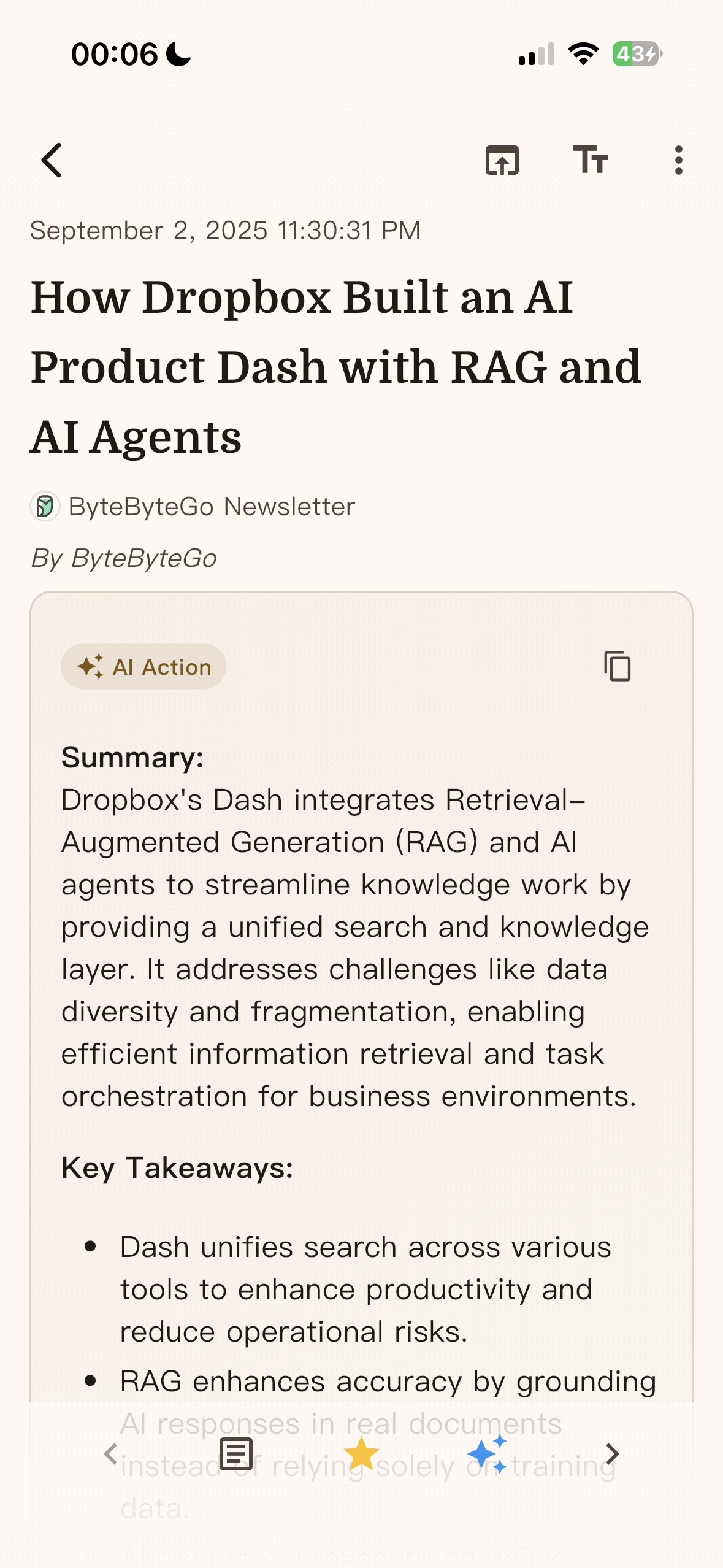
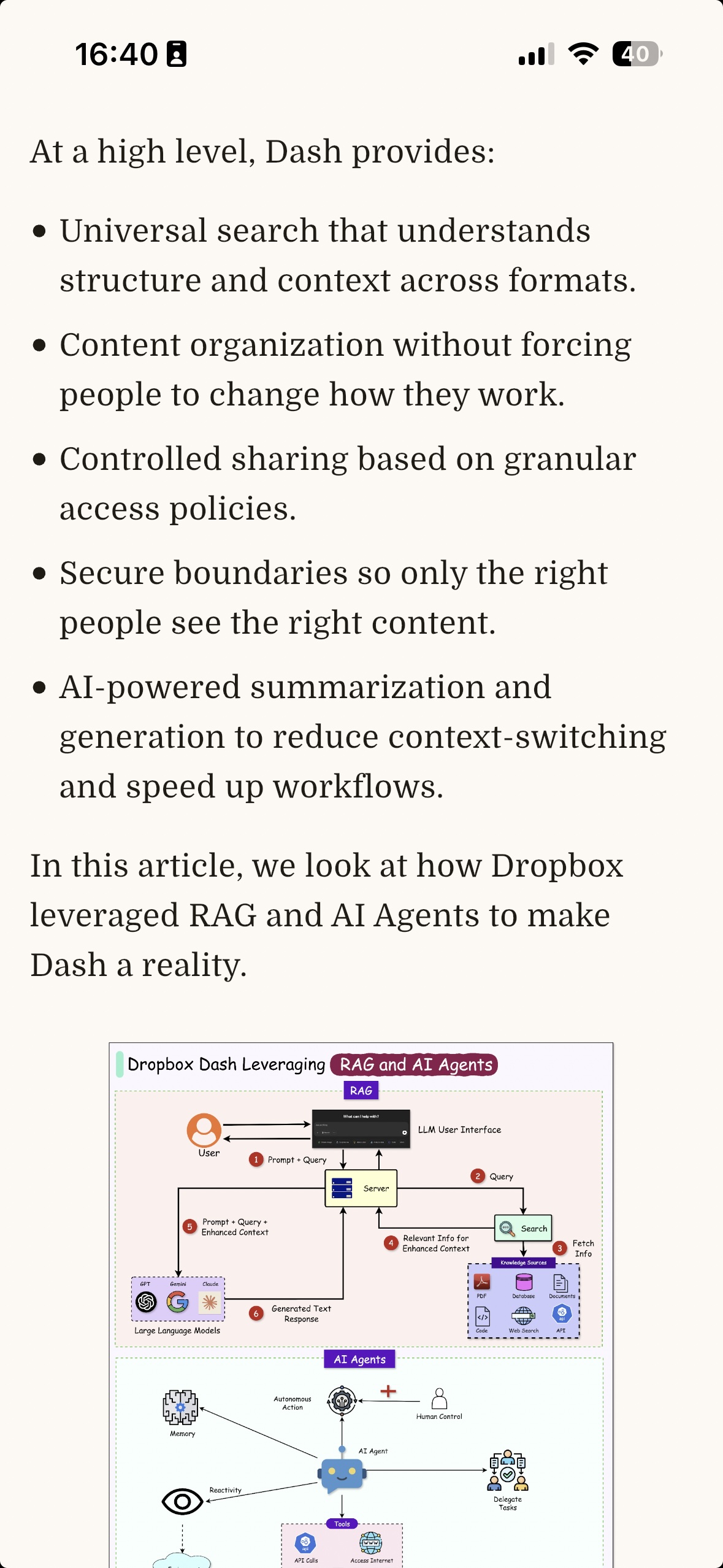
<p>The platform empowers users to fully customize AI actions through tailored prompts, seamlessly integrating with major AI providers like OpenAI, Anthropic, and Google Cloud AI. By designing precise instructions, users can leverage these services to perform a wide range of custom tasks—such as generating smart summaries, executing accurate translations, extracting key phrases, analyzing sentiments, or even creating structured data from unstructured text. This flexibility ensures that AI workflows are not only efficient and scalable but also perfectly aligned with specific user needs, enabling both technical and non-technical users to harness advanced AI capabilities without constraints.</p>

<p>
<img src="https://vinsonguo.github.io/assets/img/smartrss/Screenshot_2025-12-24-10-53-15-36_bb53aaa59eb1f897861a3c681a6c04b4.jpg" alt="Customized AI Actions" style="max-width: 200px; height: auto; margin: 20px; border-radius: 10px; box-shadow: 0 4px 8px rgba(0,0,0,0.1);" />
<img src="https://vinsonguo.github.io/assets/img/smartrss/Screenshot_2025-12-24-10-56-43-67_bb53aaa59eb1f897861a3c681a6c04b4.jpg" alt="AI Providers" style="max-width: 200px; height: auto; margin: 20px; border-radius: 10px; box-shadow: 0 4px 8px rgba(0,0,0,0.1);" />
</p>

<p>Unlock deeper insights at a glance. Move beyond isolated articles and let our advanced AI analyze your feed. SmartRSS can intelligently group up to 100 articles based on their topics, narratives, or underlying connections.</p>

<h3 id="-universal-sync--integration">🔄 Universal Sync &amp; Integration</h3>

<p>
<img src="https://vinsonguo.github.io/assets/img/smartrss/Screenshot_2025-12-24-10-54-14-82_bb53aaa59eb1f897861a3c681a6c04b4.jpg" alt="Universal Sync &amp; Integration" style="max-width: 200px; height: auto; margin: 20px; border-radius: 10px; box-shadow: 0 4px 8px rgba(0,0,0,0.1);" />
<img src="https://vinsonguo.github.io/assets/img/smartrss/Screenshot_2025-12-24-10-59-13-21_bb53aaa59eb1f897861a3c681a6c04b4.jpg" alt="Universal Sync &amp; Integration" style="max-width: 200px; height: auto; margin: 20px; border-radius: 10px; box-shadow: 0 4px 8px rgba(0,0,0,0.1);" />
</p>

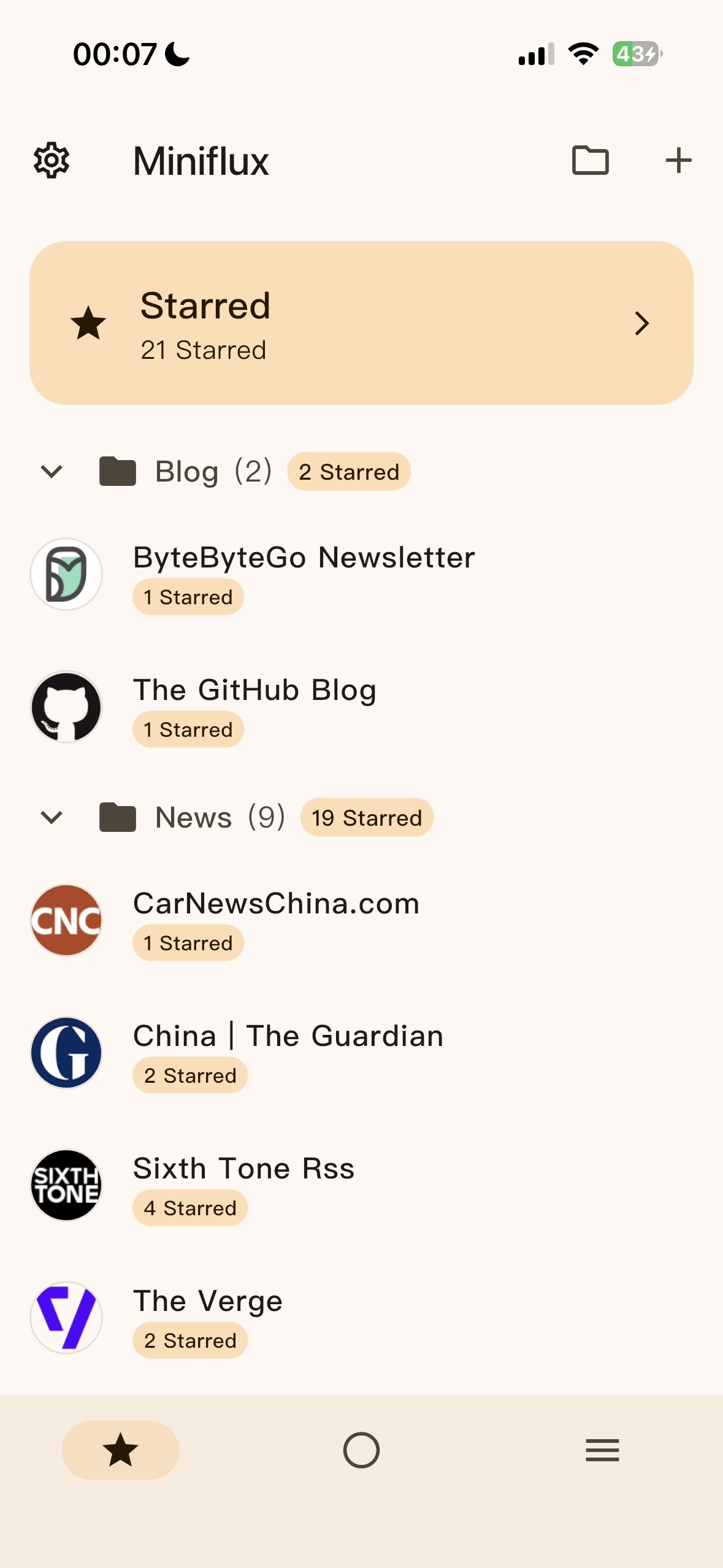
<p>Never lose an update. SmartRSS serves as the central hub for all your feeds, supporting robust <strong>multi-account synchronization</strong> with virtually any backend service, including:</p>

<ul>
  <li><strong>Self-hosted:</strong> FreshRSS, Miniflux</li>
  <li><strong>Cloud Services:</strong> Feedbin, Bazqux</li>
  <li><strong>Legacy API:</strong> Google Reader API Compatibility</li>
</ul>

<p>This makes transition seamless and gives you unparalleled freedom in managing your content sources.</p>

<h3 id="-multi-platform-content-support">🌐 Multi-Platform Content Support</h3>

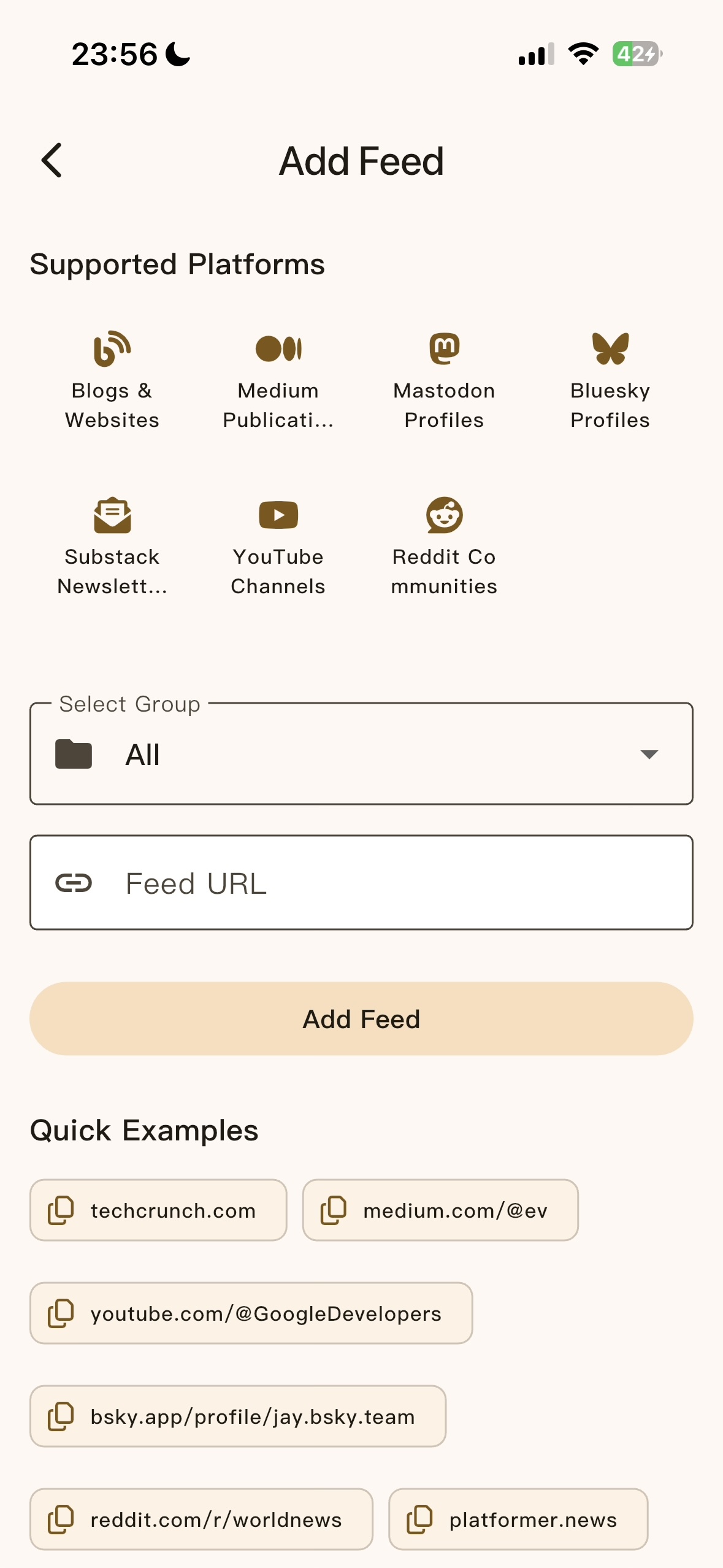
<p>One of SmartRSS’s standout features is its extensive platform support. The app seamlessly integrates with:</p>

<p><img src="https://vinsonguo.github.io/assets/img/smartrss/IMG_7335.jpeg" alt="Add Feed Interface" style="max-width: 300px; height: auto; display: block; margin: 20px auto; border-radius: 10px; box-shadow: 0 4px 8px rgba(0,0,0,0.1);" /></p>

<ul>
  <li><strong>Traditional Blogs &amp; Websites</strong> - Classic RSS feeds</li>
  <li><strong>Medium Publications</strong> - Follow your favorite writers</li>
  <li><strong>Mastodon Profiles</strong> - Stay connected with the decentralized social web</li>
  <li><strong>Bluesky Profiles</strong> - Keep up with the newest social platform</li>
  <li><strong>Substack Newsletters</strong> - Never miss important newsletters</li>
  <li><strong>YouTube Channels</strong> - Get notified of new videos</li>
  <li><strong>Reddit Communities</strong> - Track discussions that matter to you</li>
</ul>

<p>This unified approach means you can follow all your favorite content creators and sources from a single app, regardless of which platform they use.</p>

<h3 id="-personalized-experience">🎨 Personalized Experience</h3>

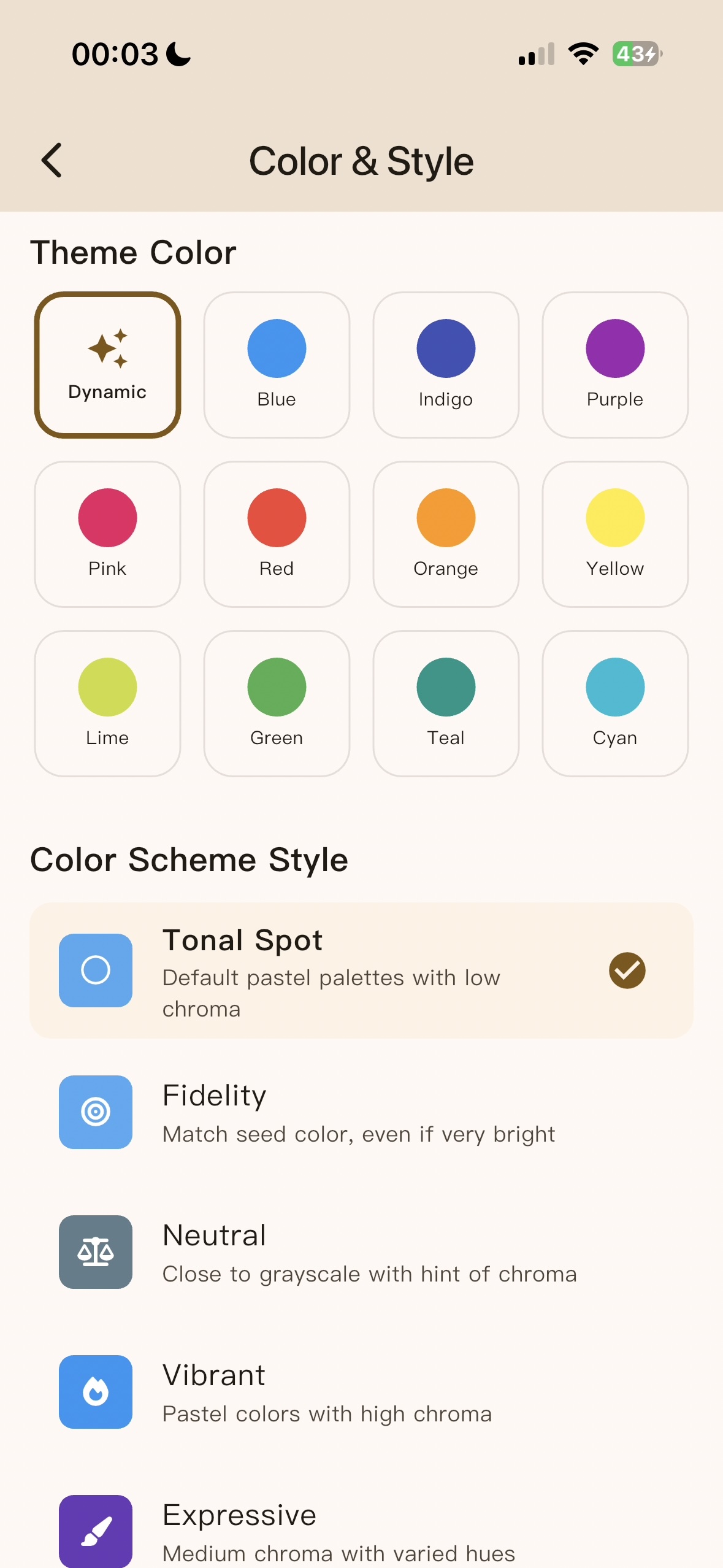
<p>SmartRSS puts customization at your fingertips with extensive theming options:</p>

<p>
<img src="https://vinsonguo.github.io/assets/img/smartrss/IMG_7336.jpeg" alt="Theme Customization" style="max-width: 200px; height: auto; margin: 20px; border-radius: 10px; box-shadow: 0 4px 8px rgba(0,0,0,0.1);" />
<img src="https://vinsonguo.github.io/assets/img/smartrss/IMG_7340.jpeg" alt="Theme Customization" style="max-width: 200px; height: auto; margin: 20px; border-radius: 10px; box-shadow: 0 4px 8px rgba(0,0,0,0.1);" />
</p>

<ul>
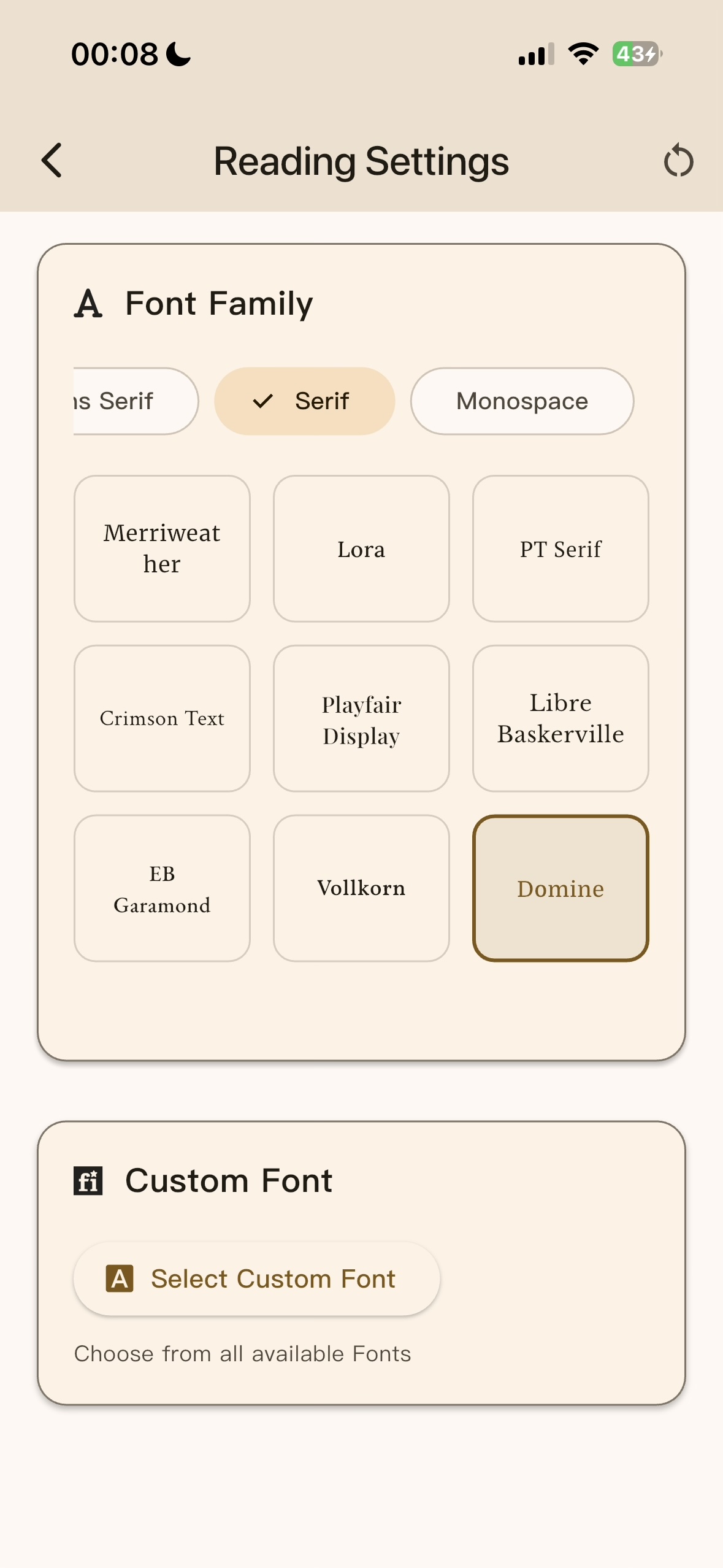
  <li><strong>1000+ Fonts</strong> - Provide 1000+ fonts</li>
  <li><strong>Dynamic Color Themes</strong> - Choose from 12 beautiful color options</li>
  <li><strong>Adaptive Color Schemes</strong> - Multiple style options including Tonal Spot, Fidelity, Neutral, Vibrant, and Expressive</li>
  <li><strong>Smart UI Adaptation</strong> - The interface adapts to your preferences for optimal readability</li>
</ul>

<h3 id="-superior-reading-experience">📖 Superior Reading Experience</h3>

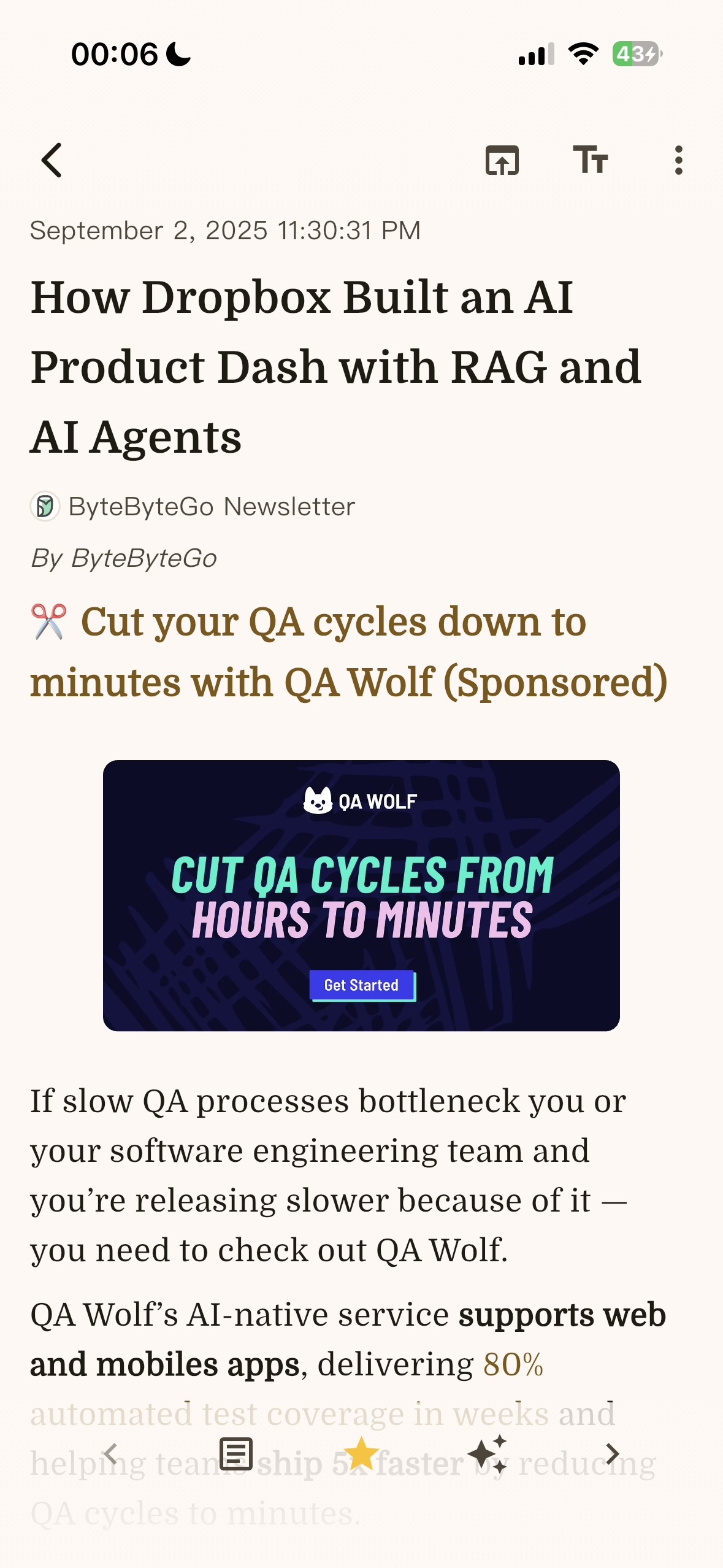
<p>The app provides a clean, distraction-free reading experience with:</p>

<p>
<img src="https://vinsonguo.github.io/assets/img/smartrss/Screenshot_2025-12-24-10-55-32-81_bb53aaa59eb1f897861a3c681a6c04b4.jpg" alt="Feeds Hub" style="max-width: 200px; height: auto; margin: 20px; border-radius: 10px; box-shadow: 0 4px 8px rgba(0,0,0,0.1);" />
<img src="https://vinsonguo.github.io/assets/img/smartrss/Screenshot_2025-12-24-10-55-49-67_bb53aaa59eb1f897861a3c681a6c04b4.jpg" alt="Article List" style="max-width: 200px; height: auto; margin: 20px; border-radius: 10px; box-shadow: 0 4px 8px rgba(0,0,0,0.1);" />
</p>

<ul>
  <li><strong>Clean Article Layout</strong> - Focus on content without distractions</li>
  <li><strong>Smart Content Parsing</strong> - Properly formatted articles with images and multimedia</li>
  <li><strong>Quick Actions</strong> - Easy sharing, bookmarking, and navigation</li>
  <li><strong>Responsive Design</strong> - Optimized for different screen sizes</li>
</ul>

<h3 id="-quick-setup--discovery">🚀 Quick Setup &amp; Discovery</h3>

<p>Getting started with SmartRSS is incredibly easy. The app includes:</p>

<ul>
  <li><strong>Quick Examples</strong> - Pre-configured feeds for popular sites like TechCrunch, Medium, YouTube channels, and more</li>
  <li><strong>Intelligent Feed Detection</strong> - Just paste a URL and let SmartRSS find the right feed</li>
  <li><strong>Group Organization</strong> - Organize your feeds into custom categories</li>
</ul>

<p>
<img src="https://vinsonguo.github.io/assets/img/smartrss/IMG_7335.jpeg" alt="Feeds Hub" style="max-width: 200px; height: auto; margin: 20px; border-radius: 10px; box-shadow: 0 4px 8px rgba(0,0,0,0.1);" />
<img src="https://vinsonguo.github.io/assets/img/smartrss/Screenshot_2025-12-24-10-55-32-81_bb53aaa59eb1f897861a3c681a6c04b4.jpg" alt="Feed List" style="max-width: 200px; height: auto; margin: 20px; border-radius: 10px; box-shadow: 0 4px 8px rgba(0,0,0,0.1);" />
</p>

<h3 id="-immersive-audio-experience">🎧 Immersive Audio Experience</h3>

<p>Turn reading into listening. SmartRSS features a powerful <strong>built-in audio player</strong> that transforms your content consumption:</p>

<ul>
  <li><strong>Custom TTS (Text-to-Speech):</strong> Choose from multiple, high-quality voices and engines to have any article read aloud to you. Fully customizable for speed, pitch, and language.</li>
  <li><strong>Native Podcast Support:</strong> Subscribe, manage, and play podcast episodes directly within the app, with automatic episode fetching and background playback.</li>
  <li><strong>Universal Play Queue:</strong> Seamlessly mix and queue articles (via TTS) and podcast episodes into a single, continuous playback list for a unified listening workflow.</li>
</ul>

<p>
<img src="https://vinsonguo.github.io/assets/img/smartrss/Screenshot_2025-12-24-10-58-50-55_bb53aaa59eb1f897861a3c681a6c04b4.jpg" alt="TTS" style="max-width: 200px; height: auto; margin: 20px; border-radius: 10px; box-shadow: 0 4px 8px rgba(0,0,0,0.1);" />
</p>
<hr />

<p><em>SmartRSS is available now on the <a href="https://apps.apple.com/app/smartrss-ai-rss-reader/id6749771900">App Store</a> and <a href="https://play.google.com/store/apps/details?id=com.vinsonguo.flutter_rss_reader">Google Play</a>. Have feedback or questions? Feel free to <a href="https://vinsonguo.github.io/contact">reach out</a> - I’d love to hear from you!</em></p>]]></content><author><name>Vinson Guo</name></author><category term="apps" /><category term="rss" /><category term="mobile-development" /><summary type="html"><![CDATA[In today’s information-rich world, staying updated with your favorite blogs, news sites, and content creators can be overwhelming. That’s why I’m excited to introduce SmartRSS - an AI-powered RSS reader that revolutionizes how you discover, organize, and consume content across all your devices.]]></summary></entry></feed>